UI & Interfaces Case 282

System Library #282UI & Interfaces
#UI & Interfaces#UI#Realistic#Character#Tech#Commerce#Fashion1406 characters · 3 parameters

Prompt content

3 prompt-specific parameters. Select any colored field inline.

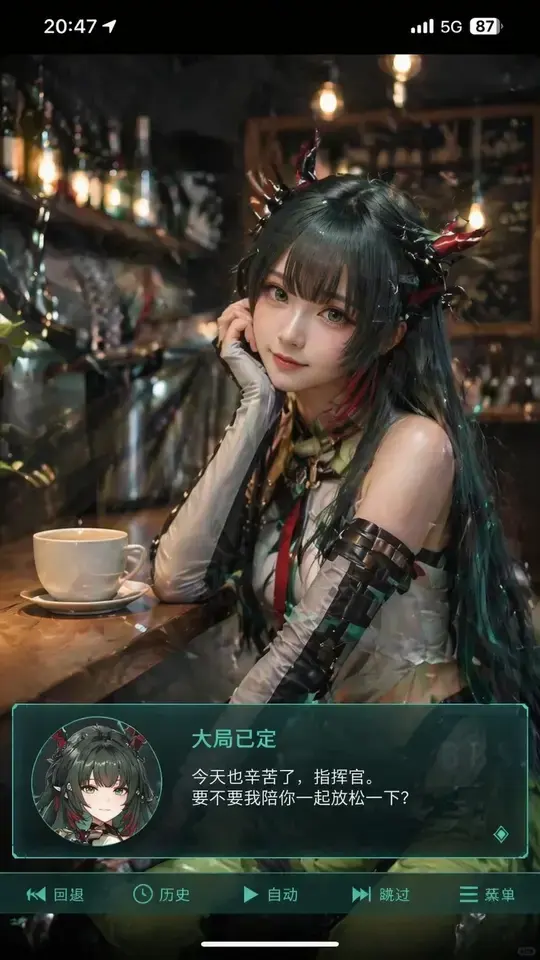
Generate a portrait mobile phone screenshot style image, with an overall aspect ratio close to 9:16. In the upper center of the frame is a real-life coser, playing a 2D anime character named . The character is in a realistic style, but with facial features slightly showing an anime feel, delicate skin, slightly larger eyes, a gentle expression looking at the camera, sitting in an indoor casual scene, such as in front of a , with background props fitting the scene. At the very top of the image, add a mobile phone system status bar UI, including icons for time, battery, signal, and network, to make the whole image look like a mobile phone screenshot. At the bottom of the image, overlay a wide semi-transparent galgame style dialog box, place a avatar corresponding to the character in the image on the left side of the dialog box; on the right side of the dialog box, typeset text: the first line displays the same character name as before in a larger font, the following one to two lines display a piece of Simplified Chinese dialogue suitable for this character's personality, in a gentle and healing style, automatically created by you. Then add an operation bar below the dialog box, imitating the galgame UI. The overall style is high-definition, rich in details, with soft lighting, and a natural fusion of 2D anime and real-life photography.

Related cases

Explore similar styles

Back to Plaza